Alignex Blog

An Important Technical Advisory on Updating SOLIDWORKS PDM

Josh Seda on January 2, 2019 at 11:30 AM

1 comments

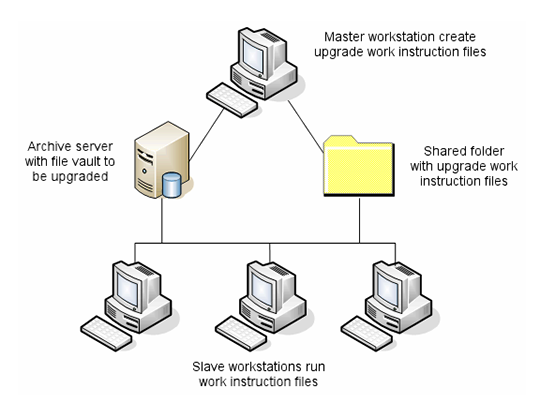
The purpose of this technical advisory is to educate companies on the proper process for upgrading SOLIDWORKS Product Data Management (PDM) in an environment which includes both CAD and PDM. Furthermore this will cover upgrading both Standard and Professional versions with a focus to the latest 2019 version.
Read More...

The Ultimate Guide to SOLIDWORKS Training - Sheet Metal

The Alignex Team on December 27, 2018 at 11:30 AM

0 comments

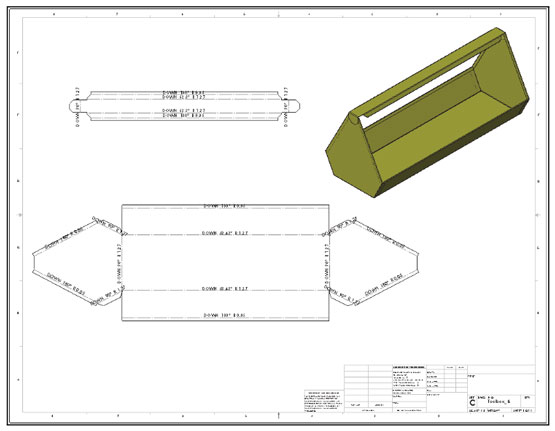
Welcome to part 7 of our Ultimate Guide to SOLIDWORKS Training series. This time around we are walking you through the entirety of the Sheet Metal course, answering any questions that may arise so you know exactly what to expect that first day in the classroom.
Read More...

How to Install Multiple Versions of SOLIDWORKS on One PC

Jackie Yip on December 20, 2018 at 11:30 AM

3 comments

When a new version of SOLIDWORKS is released,  most users choose to perform an upgrade on their machine. However, what if one of your customers is still using an older release? If you are caught in this situation, there is a way to keep a previous version on the same machine.

Read More...

Which CAM Solution Fits You?

Mike Dady on December 13, 2018 at 11:30 AM

4 comments

CAM

Hi, I’m Mike Dady, Application Engineer here at Alignex. The other day I was on the phone with a customer just getting started with CNC machining and programming. They were wondering which of the different CAM products would best suit their needs. Each product in the CAM product line brings a variety of different machining solutions that will help you optimize your operations. Let’s take a deeper look.

Read More...

The Best STEM Gifts of 2018

Kevin Breindel on December 6, 2018 at 11:30 AM

0 comments

Hey you! Yeah you. Have you looked at the calendar recently? Christmas is less than 3 weeks away, which means we have officially hit the 2 minute warning of the holiday shopping clock. Lucky for you, whether you waited till the last minute, or you are just looking for a few more presents to put under the tree, Alignex has you covered.  

I present to you our breakdown of the best STEM gifts this holiday season. They are all fun, engaging, educational and most of all, offer you the best chance possible of getting your kids to stop playing Fortnite for like, 2 seconds. Enjoy!

Read More...

Creating and Using Derived Parts in SOLIDWORKS

Eric Weber on November 29, 2018 at 11:30 AM

1 comments

Every SOLIDWORKS user has a basic understanding of how file references work. We typically make a part then create a drawing that shows views of this part. When creating the views on the drawing, what is really happening is the drawing views are looking at the actual part file and displaying it in a way that is based on our view settings. We say that the drawing references the part file.

Read More...

How Much Do You Really Know About Model-Based Definition?

Cole McLeod on November 15, 2018 at 11:30 AM

1 comments

We live in a 3D world, so doesn't it make sense that we design in a 3D world? One would think, but for some reason we continue to communicate the same way we have for over 100 years, in a 2D drawing. Luckily there is an opportunity to take that next step toward communicating Product Manufacturing Information. That step is Model-Based Definition.

Read More...

Will MBD Change Manufacturing Forever?

Rob Lambrecht on September 27, 2018 at 11:30 AM

1 comments

SOLIDWORKS Model-Based Definition (MBD) is an integrated drawing-less manufacturing solution for SOLIDWORKS. It helps companies define, organize, and publish 3D Product and Manufacturing Information (PMI), including 3D model data in industry-standard file formats.

Unlike traditional 2D drawings, SOLIDWORKS MBD guides the manufacturing process directly in 3D, which streamlines production, cuts cycle time, reduces errors, and helps compliance with industry standards.

Read More...

What is Configure, Price and Quote (CPQ) Software?

Guest Author - DriveWorks Team on September 20, 2018 at 11:30 AM

0 comments

Online customization tools are becoming increasingly popular and they’re used by many companies as a way to cost-effectively offer customizable products.

This type of software is often referred to as Configure, Price and Quote (CPQ) software.

Read More...

How to Transform a Solid Object into a Complex Surface

Jackie Yip on September 13, 2018 at 11:30 AM

5 comments

In this video blog, Alignex engineer Jackie Yip demonstrates how to harness the unique Dome and Deform functionality in SOLIDWORKS to transform a solid object it into a complex surface with ease.

Read More...

0 comments

Leave a comment