Alignex Blog

How to Change a SOLIDWORKS Stand-Alone Serial Number

Cristian Arnold on May 4, 2017 at 10:35 AM

2 comments

Need to upgrade your stand-alone serial number to a new one or move a stand-alone license to a different computer? Follow these steps on how to change a SOLIDWORKS serial number. These steps must be completed directly on the computer where the serial number is changing.

Read More...

SOLIDWORKS Performance Test: How Fast is Your Hardware?

Sam Oanes on April 19, 2017 at 3:10 PM

2 comments

Feel like your SOLIDWORKS is running a little slow? Try the SOLIDWORKS Performance Testwhose primary goal is to benchmark how fast your computer can complete SOLIDWORKS-related tasks. 

Read More...

Mechanical Integration is a Breeze with SOLIDWORKS PCB Connector

Alyssa Batista on April 11, 2017 at 8:15 AM

1 comments

With the help of SOLIDWORKS PCB Connector, MCAD and ECAD design teams can now work together effectively with a single reference for product design. The Connector provides a managed environment for seamless collaboration between SOLIDWORKS PCB and SOLIDWORKS.

Read More...

Activate/Deactivate SOLIDWORKS for Use on Multiple PCs

Travis Quick on April 5, 2017 at 8:57 AM

0 comments

If you are currently using a stand-alone SOLIDWORKS license, you may not be aware that you have the ability to use that license anywhere you have SOLIDWORKS installed! Simply run through the deactivate process on your active system and this will free the license up to be activated on another computer. This allows you to quickly transfer your license from your workstation, to a lab computer, to your home computer or anywhere else you need to run SOLIDWORKS.

Read More...

How to Modify a Stand-Alone License to a SolidNetWork License

The Alignex Team on March 28, 2017 at 1:56 PM

0 comments

To achieve greater flexibility for floating a license between users or to allow for scaling, we recommend modifying a Stand-Alone license to a SolidNetWork License (SNL). Follow the steps below to change individual SOLIDWORKS computers from Stand-Alone to operate on the License Network.

Read More...

Faster Rendering with SOLIDWORKS Visualize Boost and PowerBoost

Dean Schley on March 23, 2017 at 10:17 AM

0 comments

The introduction of SOLIDWORKS Visualize Professional and a new add-on product is providing a way to create high quality images and animations faster than ever before. Before we discuss the benefits of Visualize Boost, let’s go over how rendering SOLIDWORKS data has been handled in the past.

Read More...

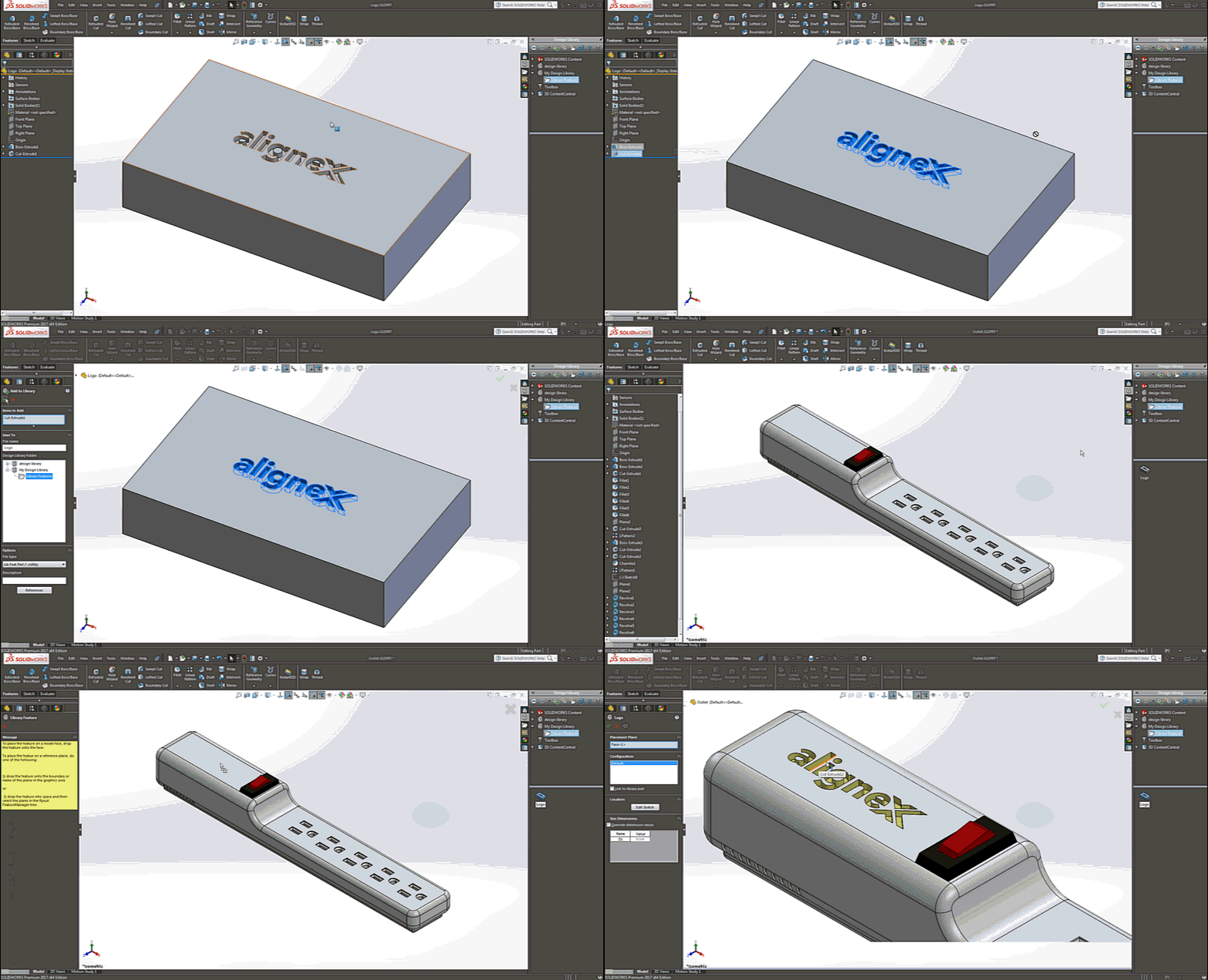
15 Quick Steps to Setup a Design Library Feature

Jesse Butwinick on March 8, 2017 at 7:45 AM

0 comments

Are you finding yourself generating the same feature every time you create a new part? Would you like an easy way to stamp your company logo into your products? Then the Library Feature in SOLIDWORKS is meant for you!

Read More...

Sneak Peek: Upgrade for Easier Item, Process and Project Management

The Alignex Team on March 2, 2017 at 8:10 AM

1 comments

If you already like the ease-of-use and file management capabilities of PDM Professional, you’ll want to keep an eye on SOLIDWORKS Manage. This new addition to the data management product line will give you a higher level of item management and the ability to manage resources, project timelines and complex business processes.

Read More...

A Complete Guide to Using SOLIDWORKS Toolbox

The Alignex Team on February 23, 2017 at 8:55 AM

0 comments

Every year, we update our resource center with technical support documents and quick guides for customers seeking additional help with SOLIDWORKS. Our SOLIDWORKS Toolbox Guide Packet is now available with the latest guides to many different common user actions and their best practices.

This 4-part guide covers administration, customization, access or display, and a permission setting overview of SOLIDWORKS Toolbox.

Read More...

Top 10 Highlights of My First Year at SOLIDWORKS World

Travis Quick on February 14, 2017 at 1:58 PM

1 comments

My name is Travis Quick and I am an Application Engineer with Alignex, based out of Edina, MN. This was my first year at SOLIDWORKS World and I’m excited to tell you about all the great things that went on! From the cool technology that was represented at the Partner Pavilion, to the great new things customers are doing, to getting to meet all the amazing people at SOLIDWORKS that help make this community such a wonderful group to be a part of.

Read More...

0 comments

Leave a comment