
It's Day 3 at SOLIDWORKS World 2017! In today's general session, we got an exciting preview of new features coming to SOLIDWORKS 2018.
Here are 6 features that got spontaneous audience applause!

It's Day 3 at SOLIDWORKS World 2017! In today's general session, we got an exciting preview of new features coming to SOLIDWORKS 2018.
Here are 6 features that got spontaneous audience applause!

It has come to the attention of the DraftSight team at SOLIDWORKS that, due to an expired certificate, Windows* 32 & 64-bit versions of DraftSight released from 2012 to 2017 will not launch and/or will stop running as of March 1, 2017.
To avoid usage interruption, please make sure to immediately download and install this critical DraftSight hotfix, which can be found on the main product download page.
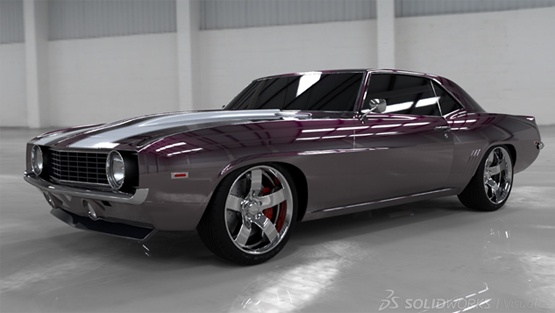
Since the release of the new external rendering software SOLIDWORKS Visualize in early 2016, there has been a bit of confusion as to where PhotoView 360 fits into the SOLIDWORKS family of products.
Wait, there is a new external product for rendering your parts and assemblies? Don’t we have PhotoView 360 already? Well yes, but SOLIDWORKS Visualize helps both non-technical users and CAD users leverage 3D CAD data to create photo ‘catalog’ quality renderings and content.

Last Wednesday, Alignex hosted 10 high school students participating in Mayer Lutheran's J-Term Engineering Exploration course. Their visit to Alignex was part of a 4-day field trip visiting machine shops, design shops and 3D printers throughout the Twin Cities to explore careers in engineering and related fields.

Looking back on 2016, there have been a number of Alignex video blog posts that have topped our charts. While these posts cover a wide range of topics, they all share one common goal—to highlight key tools and features in SOLIDWORKS to help save you time, avoid rework costs and ultimately streamline your design process.
Here are the top 8 SOLIDWORKS video blogs of 2016...
![Boolean Operations and Multibody Techniques in SOLIDWORKS [VIDEO]](https://embedwistia-a.akamaihd.net/deliveries/cfe3762200dd1834b43459691b4978c9e2caa770.jpg?image_crop_resized=640x360 "Boolean Operations and Multibody Techniques in SOLIDWORKS [VIDEO]")
Do you reuse geometry from other SOLIDWORKS part models to elminate the need to re-model or sketch a new part?
In this video blog, I'll be taking a look at boolean operations—such as Common, Add and Subtract—and other multibody techniques to increase the speed of your design creations and reduce the time spent fixing broken trees. Plus, learn how to maintain existing features while also adding new geometry.

Did you know Alignex is a proud sponsor of STEM programs? STEM is an acronym for Science, Technology, Engineering and Math—subjects that help kids develop critical thinking skills, problem-solving skills and interact with real-world challenges.

Customers frequently ask us for some guidelines on the best hardware to run SOLIDWORKS on. Luckily, there are some simple guidelines on configuration to help you pick the right type of workstation for your needs. In this post, we will list each of the major types of components and describe how each of the characteristics affect SOLIDWORKS performance.

To start using Weldments in SOLIDWORKS, create simple layouts with simple line entities along a 2D or 3D sketch. With the power of structural members, you can then group and display all items in the part level. In this blog, I'll show why weldments in SOLIDWORKS is one of the most powerful and fundamental toolsets.
![How to Confirm Hole Alignment in Your SOLIDWORKS Assemblies [VIDEO]](https://embedwistia-a.akamaihd.net/deliveries/deb4780a1b97b37aa1de897df8444575cd26244f.jpg?image_crop_resized=640x512 "How to Confirm Hole Alignment in Your SOLIDWORKS Assemblies [VIDEO]")
Ensuring hole alignment between mating components in your assembly designs, prior to manufacturing, can accelerate the overall product development process, save you time and help you to avoid rework costs.